Monetization
itunes like store
Layout
Fixed
Responsive
Book-like?
Interaction
Comments
Discussion
http://www.youtube.com/watch?feature=player_embedded&v=ac2sGuE3kEw
using shopify
comicsology dumb
a system to cloud then swap out
wrap it in a app with phone gap
or like wormworld through applestore download free and pings when theres a new episode
no drm
mignola art looks good on ereader
craig mod talk
i love typography posted a video on him craig
some content requires fixed layout, but usually designing the grid that is responsive
no forcing the reader to choose a certain font
wormworld doesnt do anything fancy but uses the strenghth of a browser and touch technolgy
using the strengths of the medium that you cant do in print
yzes bigerel
flash thingys
marvel highers
you are in coltrol of moving left and right
character moves through the panel

Showing posts with label Research. Show all posts
Showing posts with label Research. Show all posts
Thursday, August 16, 2012

Self publishing an illustrated E book
My Commentary
According to Holly Brady an E book publisher, if your considering publishing or republishing an illustrated book, like a cookbook, a children's book or a graphic novel you need to present such books in a fixed layout format. A fixed layout unlike an adaptive or liquid layout will not make dynamic changes for different mobile devices or mobile device orientations. Holly's points out that adaptive layouts tend to impede ones ability to read illustrated content in which the layout is part of the reading experience.
Assuming that Holly's point is valid how does one go about publishing an illustrated ebook with a fixed layout? According to Holly "There aren’t yet many vendors who know how to take a print book and turn it into an enhanced ebook for the iPad." She recommended two companies which translate books formatted for print into electronic publications: YUDU, and Innodata. I downloaded one of the books reformatted by Holly through YUDA and was not that impressed with the result. In addition since I already have a lot of digital layout knowledge already I'm a bit reluctant to hire a third party to accomplish something I could probably learn myself.
I did a little more research and learned that the last couple versions of InDesign have the ability to export ebooks. Exporting ebooks with a fixed layout seems a bit more difficult than an adaptive layout export but I learned by watching tutorials through linda.com that it is possible without a third party.
How to Publish an Ebook Picture Book from a Mac: for Nook, Kindle, PDF http://jujubeeillustrations.blogspot.com/2012/01/how-to-create-and-publish-ebook-picture.html

I promised I'd post the process I used to create my ebook, "Princesses, Princesses, Princesses!" for PDF download, for Kindle, for Nook. It's actually not that hard but certain steps can be tricky. Hopefully this little tutorial will help you avoid some of my mistakes. I need to thank VonLogan Brimhall for their tutorial. It got me started. It may work well for PC users, but I am an Apple girl. So there were just some parts that didn't translate well. In addition, the dimensions they proposed for the devices didn't work for me when importing to InDesign and to the devices from there. And finally, there were a few easier tricks I learned in the process.
Remember, Kindle and Nook both have free apps for iphone and ipad and in the android market so anything sold by them can be read on those devices as well. You aren't limited to just kindle or nook users.
Here's what programs I used...so if you don't have these 2 programs, this tutorial won't be super useful to you. I'm sorry.
Or download a PDF of this entire post, HERE.
Convert text files to PDF optimized for ebook
http://ebook.online-convert.com/convert-to-pdf
Creating an Illustrated EBook
http://www.hollybrady.com/creating-an-illustrated-ebook
Are you considering republishing your children’s book, cookbook, graphic novel, crafts guide or travel book in digital format?
For these kinds of books, the ePub format—which allows words to flow from one page to another as your reader enlarges text or changes fonts—doesn’t work. The illustrations, sidebars, and photos you so carefully placed beside certain sections of your book take on a life of their own.
For such books, you need to create a fixed-layout file, one that displays each spread just as your designer originally planned.

Fixed-layout ebooks look great on the new tablets that everyone’s getting for Christmas (Apple iPad, B&N Nook, Kobo VOX). But they are tricky to produce, especially if you’re moving from a print book into an enhanced iBook for the iPad.
Renowned explanation graphics designer Nigel Holmes and I have been running down rabbit holes for the past year trying to get his book Pinhole and the Expedition to the Jungle into a fixed-layout format for the iPad. We finally did it.
And here are the top things we learned:
http://tv.adobe.com/watch/indesign-cs5-feature-tour/ebook-document-design-with-cs5-design-premium/
According to Holly Brady an E book publisher, if your considering publishing or republishing an illustrated book, like a cookbook, a children's book or a graphic novel you need to present such books in a fixed layout format. A fixed layout unlike an adaptive or liquid layout will not make dynamic changes for different mobile devices or mobile device orientations. Holly's points out that adaptive layouts tend to impede ones ability to read illustrated content in which the layout is part of the reading experience.
Assuming that Holly's point is valid how does one go about publishing an illustrated ebook with a fixed layout? According to Holly "There aren’t yet many vendors who know how to take a print book and turn it into an enhanced ebook for the iPad." She recommended two companies which translate books formatted for print into electronic publications: YUDU, and Innodata. I downloaded one of the books reformatted by Holly through YUDA and was not that impressed with the result. In addition since I already have a lot of digital layout knowledge already I'm a bit reluctant to hire a third party to accomplish something I could probably learn myself.
I did a little more research and learned that the last couple versions of InDesign have the ability to export ebooks. Exporting ebooks with a fixed layout seems a bit more difficult than an adaptive layout export but I learned by watching tutorials through linda.com that it is possible without a third party.
How to Publish an Ebook Picture Book from a Mac: for Nook, Kindle, PDF http://jujubeeillustrations.blogspot.com/2012/01/how-to-create-and-publish-ebook-picture.html

I promised I'd post the process I used to create my ebook, "Princesses, Princesses, Princesses!" for PDF download, for Kindle, for Nook. It's actually not that hard but certain steps can be tricky. Hopefully this little tutorial will help you avoid some of my mistakes. I need to thank VonLogan Brimhall for their tutorial. It got me started. It may work well for PC users, but I am an Apple girl. So there were just some parts that didn't translate well. In addition, the dimensions they proposed for the devices didn't work for me when importing to InDesign and to the devices from there. And finally, there were a few easier tricks I learned in the process.
Remember, Kindle and Nook both have free apps for iphone and ipad and in the android market so anything sold by them can be read on those devices as well. You aren't limited to just kindle or nook users.
Here's what programs I used...so if you don't have these 2 programs, this tutorial won't be super useful to you. I'm sorry.
- Adobe Photoshop (any version should do- I have CS5)
- Adobe InDesign (version CS5 is what I used, I don't know if earlier versions work, I think CS4 does)
- Adobe Acrobat (I used Pro, you'll need more than just the reader)
Or download a PDF of this entire post, HERE.
Convert text files to PDF optimized for ebook
http://ebook.online-convert.com/convert-to-pdf
Creating an Illustrated EBook
http://www.hollybrady.com/creating-an-illustrated-ebook
Are you considering republishing your children’s book, cookbook, graphic novel, crafts guide or travel book in digital format?
For these kinds of books, the ePub format—which allows words to flow from one page to another as your reader enlarges text or changes fonts—doesn’t work. The illustrations, sidebars, and photos you so carefully placed beside certain sections of your book take on a life of their own.
For such books, you need to create a fixed-layout file, one that displays each spread just as your designer originally planned.

Fixed-layout ebooks look great on the new tablets that everyone’s getting for Christmas (Apple iPad, B&N Nook, Kobo VOX). But they are tricky to produce, especially if you’re moving from a print book into an enhanced iBook for the iPad.
Renowned explanation graphics designer Nigel Holmes and I have been running down rabbit holes for the past year trying to get his book Pinhole and the Expedition to the Jungle into a fixed-layout format for the iPad. We finally did it.
And here are the top things we learned:
- There aren’t yet many vendors who know how to take a print book and turn it into an enhanced ebook for the iPad. We used YUDU, which is located in (surprise!) Great Britain. Innodata also works, I’m told.
- Price pressure on these books is fierce. You spend a chunk to have the book recreated for the iPad, and the market wants to pay $3.99 or less. Yike. Hopefully, all those folks who got iPads for Christmas will be looking to buy enhanced ebooks, which could drive up revenue.
- If you hold the iPad in landscape mode, you see an entire spread from the book–without a seam. Nice! But on the iPad’s 10-inch screen, the font you chose for your print book looks small—and on the 7-inch screen of all the other tablets, it’s unreadable. Of course, your readers can enlarge the text with their fingers, but then you lose the effect of the spreads.
- Every new format of a book requires a separate ISBN number. Per BISG.
http://tv.adobe.com/watch/indesign-cs5-feature-tour/ebook-document-design-with-cs5-design-premium/
Coins of the Realm - Scott McCloud
My Commentary
In his 5th and 6th episodes of I Can't Stop Thinking Scott McCloud discusses monetization of web comics. In Coins of the Realm - Part 1, he mentions that many site rely on advertisements as opposed to direct payment. I agree users will leave if they are forced to fill out a form and supply their credit card information. I think that something like iTunes works so well because all the user has to do it click the buy now button.


In his 5th and 6th episodes of I Can't Stop Thinking Scott McCloud discusses monetization of web comics. In Coins of the Realm - Part 1, he mentions that many site rely on advertisements as opposed to direct payment. I agree users will leave if they are forced to fill out a form and supply their credit card information. I think that something like iTunes works so well because all the user has to do it click the buy now button.
Coins of the Realm - Part 1


Coins of the Realm - Part 2


Thursday, July 26, 2012
Popular Web Comics - overview
http://mashable.com/2009/03/03/web-comics/


One of the unique parts of the 8 Bit Theater is the comment section in the left navigation bar.
The site is not modified for mobile. The sprite used to create the hover state on the main comic navigation breaks in the mobile version


http://www.kickstarter.com/projects/78728598/the-last-sleeper-episode-1
Interactive Cinematic Story
The Last Sleeper is an audio-visual experience that seamlessly blends audio-books, 2D animation, comics, and adventure games into one groundbreaking interactive story.
What is the Last Sleeper?
The Last Sleeper is an interactive story. It's like a game, but every element is focused on YOUR experience of the story. We want it to be a fluid experience that leads you on an emotional ride.
What is the gameplay?
The Last Sleeper presents the story for you to play through. Adam does a lot of exploration of this alien world, so you move him across the screen with multitouch controls.
As Adam discovers his connection to the Light of Ephos, you discover it as well. The core of the game centers around what you DO once you have the energy - whether it is healing Fera, building a bridge out of trees, creating a shield of Light for the villagers...
It's all made from the ground up to take advantage of the multitouch interface on the iPad.
Are there cinematics?
No. Everything is interactive. It's made to be a cinematic experience that reacts around you - from the music of Steve Jablonsky, the sound design of Ethan and Erik, and the wonderful art. It's driven by YOU.
Toy Story Read Along
http://itunes.apple.com/us/app/toy-story-read-along/id364376920?mt=8

Alice for the iPad
http://itunes.apple.com/us/app/alice-for-the-ipad/id354537426?mt=8
Based around geek culture and running since 1998.


 |
| Changing Header |

Created by Brian Clevinger in 2001.
One of the unique parts of the 8 Bit Theater is the comment section in the left navigation bar.
The site is not modified for mobile. The sprite used to create the hover state on the main comic navigation breaks in the mobile version


Created by Daniel Lieske in 2010.


Author: John Pavlus
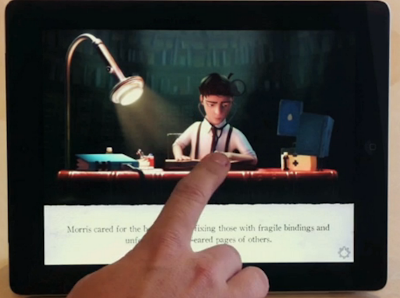
Designing interactive interfaces for kids is no mean feat, and the Moonbot team really made some great choices with "Morris Lessmore." When you open up the app, it doesn't waste your time with teaching-screens about how to interact with it--it just smoothly enters the story. (A key feature, I imagine, when you want to get Junior to go the youknowwhat to sleep ASAP.) Gently animated cues surface in the lush visuals at just the right time, encouraging you to explore the app rather than slavishly plod through it: When a house gets picked up in a tornado, you can use your fingers to swipe and spin it around--but you don't have to.
In fact, the interface design is so subtle it wasn't until I was about six pages in that I realized that every page of the app has some delightful feature embedded into it that you have to find for yourself. This is the key to a successful children's book--inviting them to play and explore and be curious, not just jab buttons to activate cheesy visual effects. And mercifully, every gewgaw in the book has a button so you can toggle it on or off: For example, you can kill the voiceover so you can read to your kid in your own voice the way God intended, or silence the music and sound effects if you want to. But they're all just a tap away if you change your mind--and the whole experience is so well-produced, you very well just might.




Author: Lauren Davis
Jonas hasn't had the easiest eighth grade year. He just lost his mother in a house fire. His father won't tell him which high school he'll be going to. And he spends most of his time doodling and daydreaming when he should be doing schoolwork. But his talent for imagination may come in handy when he finds himself on a journey through a magic mirror.
Daniel Lieske's The Wormworld Saga is a gorgeously illustrated illustrated webcomic that drifts dreamily down the infinite canvas. We start on Jonas' last day of school, where he's the only kid who doesn't know where he's going to high school. When he asks his well-meaning but uptight father, he just gets an earful about his poor grades. Jonas is a disappointment to his father on a number of fronts — not only is he more a doodler than a student, but he's also had an intense fear of fire ever since his mother died. When a fireplace throws him into panic attacks, his father demands strength rather than offering sympathy.
But for Jonas, none of that matters because he's in his favorite place in the world: his grandmother's house in the country. At grandma's, there is a cat and dog to be his companion, a forest to act out his private adventures in, and an attic to serve as his secret hideout. Something more lurks in grandma's house, though, and when something magic touches a mirror in the attic, it opens up a door to another world. And it's only a matter of time before Jonas leaps through.
So far, there have been two long and lovely installments of Wormworld, with another one due in April. I'm looking forward to the background details and bright colors Lieske is sure to pack in future chapters, but I'm most excited about the development of little Jonas. Yes, Jonas' father could stand to loosen up a bit, but Jonas, for his wooden sword and his tales of daring-do, will need to become a bit more responsible and a great deal braver.


Author: John Pavlus
An Ex-Pixar Designer Creates Astounding Kids’ Book On iPad
"The Fantastic Flying Books of Mr. Morris Lessmore" is like a well-written bedtime story and an immersive animated movie at once.
E-books are already a fraught subject for many readers, writers, publishers and designers, but children's e-books are even more so. Is it rotting their minds? Is it as good as good ol' paper? Is it too interactive for their own good? Obviously there are no practical answers to such questions, but at least one children's e-book/app/thingie (what do we call these things, again?) is doing it very, very right. It's called "The Fantastic Flying Books of Mr. Morris Lessmore," and it's like a well-written bedtime story and an immersive animated movie at once -- without being "too much" of either.
E-books are already a fraught subject for many readers, writers, publishers and designers, but children's e-books are even more so. Is it rotting their minds? Is it as good as good ol' paper? Is it too interactive for their own good? Obviously there are no practical answers to such questions, but at least one children's e-book/app/thingie (what do we call these things, again?) is doing it very, very right. It's called "The Fantastic Flying Books of Mr. Morris Lessmore," and it's like a well-written bedtime story and an immersive animated movie at once -- without being "too much" of either.
Every page has some delightful, hidden feature embedded into it.Part of why the book works so well is its top-shelf creative pedigree: author William Joyce is also an accomplished illustrator and animator who's published New Yorker covers, won a bunch of Emmys, created character designs for some of Pixar's first animated classics, and worked on many others for Dreamworks and Disney. With his cohorts at Moonbot Studios, he created an interactive book-app around the story and a standalone animated film--so you can experience "The Fantastic Flying Books of Mr. Morris Lessmore" however you like.
Designing interactive interfaces for kids is no mean feat, and the Moonbot team really made some great choices with "Morris Lessmore." When you open up the app, it doesn't waste your time with teaching-screens about how to interact with it--it just smoothly enters the story. (A key feature, I imagine, when you want to get Junior to go the youknowwhat to sleep ASAP.) Gently animated cues surface in the lush visuals at just the right time, encouraging you to explore the app rather than slavishly plod through it: When a house gets picked up in a tornado, you can use your fingers to swipe and spin it around--but you don't have to.
In fact, the interface design is so subtle it wasn't until I was about six pages in that I realized that every page of the app has some delightful feature embedded into it that you have to find for yourself. This is the key to a successful children's book--inviting them to play and explore and be curious, not just jab buttons to activate cheesy visual effects. And mercifully, every gewgaw in the book has a button so you can toggle it on or off: For example, you can kill the voiceover so you can read to your kid in your own voice the way God intended, or silence the music and sound effects if you want to. But they're all just a tap away if you change your mind--and the whole experience is so well-produced, you very well just might.


Author: Lauren Davis
 Webcomic The Wormworld Saga traps a daydreamer on the wrong side of the looking glass
Jonas hasn't had the easiest eighth grade year. He just lost his mother in a house fire. His father won't tell him which high school he'll be going to. And he spends most of his time doodling and daydreaming when he should be doing schoolwork. But his talent for imagination may come in handy when he finds himself on a journey through a magic mirror.
Daniel Lieske's The Wormworld Saga is a gorgeously illustrated illustrated webcomic that drifts dreamily down the infinite canvas. We start on Jonas' last day of school, where he's the only kid who doesn't know where he's going to high school. When he asks his well-meaning but uptight father, he just gets an earful about his poor grades. Jonas is a disappointment to his father on a number of fronts — not only is he more a doodler than a student, but he's also had an intense fear of fire ever since his mother died. When a fireplace throws him into panic attacks, his father demands strength rather than offering sympathy.
But for Jonas, none of that matters because he's in his favorite place in the world: his grandmother's house in the country. At grandma's, there is a cat and dog to be his companion, a forest to act out his private adventures in, and an attic to serve as his secret hideout. Something more lurks in grandma's house, though, and when something magic touches a mirror in the attic, it opens up a door to another world. And it's only a matter of time before Jonas leaps through.
So far, there have been two long and lovely installments of Wormworld, with another one due in April. I'm looking forward to the background details and bright colors Lieske is sure to pack in future chapters, but I'm most excited about the development of little Jonas. Yes, Jonas' father could stand to loosen up a bit, but Jonas, for his wooden sword and his tales of daring-do, will need to become a bit more responsible and a great deal braver.

http://www.kickstarter.com/projects/78728598/the-last-sleeper-episode-1
Interactive Cinematic Story
The Last Sleeper is an audio-visual experience that seamlessly blends audio-books, 2D animation, comics, and adventure games into one groundbreaking interactive story.
What is the Last Sleeper?
The Last Sleeper is an interactive story. It's like a game, but every element is focused on YOUR experience of the story. We want it to be a fluid experience that leads you on an emotional ride.
What is the gameplay?
The Last Sleeper presents the story for you to play through. Adam does a lot of exploration of this alien world, so you move him across the screen with multitouch controls.
As Adam discovers his connection to the Light of Ephos, you discover it as well. The core of the game centers around what you DO once you have the energy - whether it is healing Fera, building a bridge out of trees, creating a shield of Light for the villagers...
It's all made from the ground up to take advantage of the multitouch interface on the iPad.
Are there cinematics?
No. Everything is interactive. It's made to be a cinematic experience that reacts around you - from the music of Steve Jablonsky, the sound design of Ethan and Erik, and the wonderful art. It's driven by YOU.
Toy Story Read Along
http://itunes.apple.com/us/app/toy-story-read-along/id364376920?mt=8

Alice for the iPad
http://itunes.apple.com/us/app/alice-for-the-ipad/id354537426?mt=8
Subscribe to:
Posts (Atom)